
5 Reasons Why We Love Livestream Studio
- It supports Closed Captions.
While we are still in the wild west phase of streaming, some of the towns are being cleaned up and the sheriff would very much like you to comply with all ADA requirements for your broadcast. I wrote a fairly lengthy blog post on closed captions here but for the quick dive just know that Livestream studio paired with a iCap Closed Caption encoder and a live transcriber make the whole process very easy and straightforward. While it’s not legally required to close caption your stream, it’s preferred for the sake of inclusivity. Added bonus-people can view your live stream while they ride BART with the volume turned off.
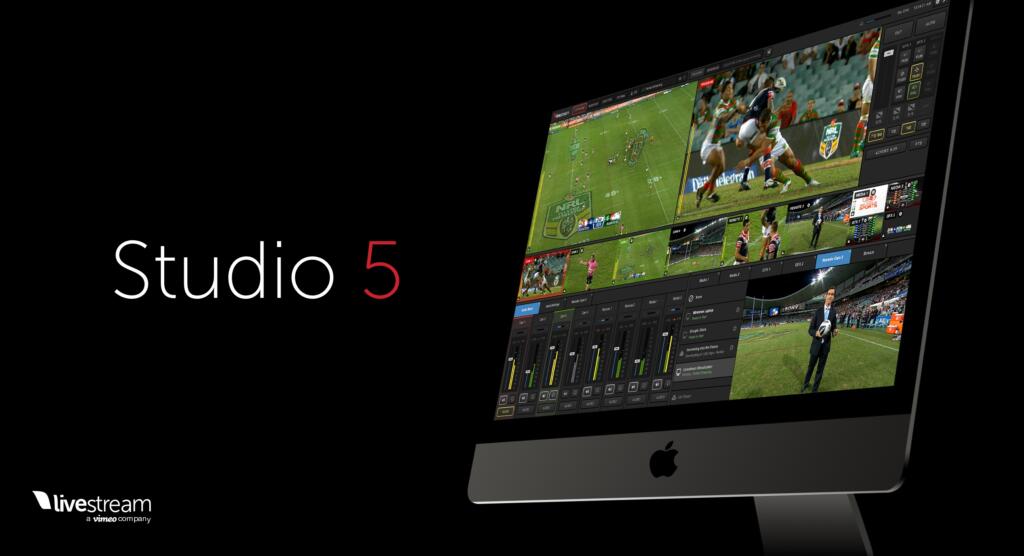 User interface is very in-depth. But it also is clean and intuitive.
You can use Studio itself as your switch, with all kinds of pre-loaded GFX, multiple cameras, customizable transitions and more. You can also use it in basic, single camera mode where the feed is from your production switch. Basically, if you don’t have all the bells and whistles you can use one application to do a pretty high quality show. But if you do have all the toys, put it in basic mode and let the program follow your switch for an easy to use CDN.
- It plays nice with the signal coming from our black magic capture card.
We use fully loaded HP Omens paired with Black Magic Ultra HD mini’s to encode our streaming video. The video signal and embedded audio arrives from switcher to encoder and is converted from SDI to USB-C for input to the computer. The software you use to do the actual encoding and send to the final destination can vary from freeware like OBS to high end applications like Wirecast Pro.
When using Wirecast, our other go to encoding software, I would often have to disable and reenable the video input to get the software to recognize it. I’ve had no such problems with Studio, the video always pops right on as soon as it’s connected. While you will need a Livestream or Vimeo premium account to download Studio, it comes with the subscription as an added benefit.
- It can stream to a variety of CDN’s, not just Livestream and Vimeo.
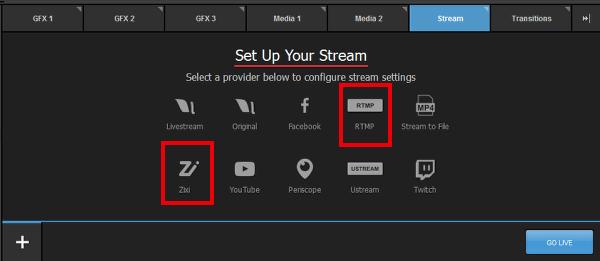
When I first opened Live Stream Studio I thought, what a great application, too bad I can only use it for Live Stream. Worry not, because after a bit more research and digging around, I found out that you can stream to other CDNs-including Facebook, Youtube, Twitch, Periscope and many more. You can even stream to multiple destinations at the same time.
- It can stream in a variety of resolutions, from 4Kto 240 and everything in between.
Not only can you stream in full 4K at 30P for those robust users watching on high quality screens, you can also simultaneously stream at 240P for your buddy still on his iPhone 5. This combination of resolutions, known as multi-bitrate streaming, is a powerful tool to ensure that everyone can watch your stream and tailer his or her own viewing experience to the quality and speed that best meets their viewing expectations and bandwidth limits. And of course, Livestream has long had dynamic streaming. This is short form to say that Livestream will adjust the default resolution it sends to each individual user on the fly based on the users hardware and internet connection.
- Bonus Reason
Vimeo, one of the big players in indie video production recently purchased Live Stream and is in the process of rolling out all kinds of cool integrations. When the leader in VOD and post production tools pairs up with the best in live streaming it makes sense for all video professionals to take a look. Especially for those professionals in the streaming world, this software has something to love for everyone.
Find out more about the Vimeo/Livestream partnership here: https://livestream.com/blog/livestream-vimeo-acquisition
Read more about Livestream Studio here: https://help.livestream.com/hc/en-us/categories/360000162127-Livestream-Studio